
Boya Notra Review: I Used This AI Note Taker for International Meetings
Facebook
Twitter
LinkedIn
Reddit
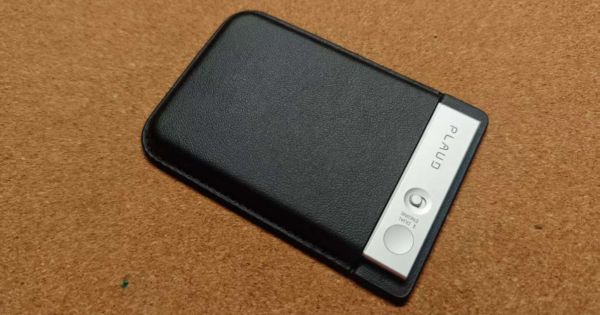
The Boya Notra AI Note Taker is a compact AI recorder for meetings, calls, lectures, interviews, and conference sessions. After using it for several months in international trade meetings, I found the build quality solid and the recording playback clear enough for reviewing business conversations.
Its biggest advantage over apps like Notta is simple: it keeps your phone free while recording.
Its biggest weakness is also clear: because it has no screen, I still sometimes worry whether recording has started successfully.
Best for: international business meetings, non-native English speakers, students, sales calls, interviews, conferences
Not best for: people who want a screen, professional audio recording, or the most mature AI note-taking ecosystem
Main alternatives: Plaud Note, Plaud Note Pro, Notta app
My rating: 8/10
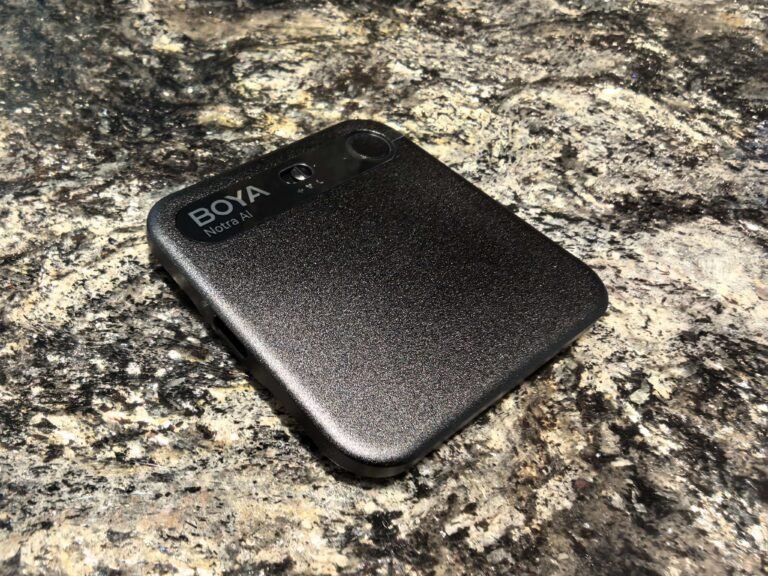
Table of Contents
Why I Needed an AI Note Taker

I work in international trade, so a lot of my meetings are with people from different countries. Most of the time, English is the working language.
That sounds fine until the meeting gets fast.
Some clients speak quickly. Some use local phrases or business slang I do not hear every day. Some jump from pricing to delivery to technical details in the same two minutes. As a non-native English speaker, I can usually follow the conversation, but I know I sometimes miss small details.
And in business, small details are usually not small.
A delivery date. A payment term. A product requirement. A casual sentence like “we may need this earlier” that turns into a real deadline later.
That is why I started caring about AI note takers.
Before testing the Boya Notra AI Note Taker, I used Notta during the Vietnam SEO Summit. Honestly, Notta was useful. It helped me record sessions and review information afterward.
But because Notta is an app, my phone became the recorder. If I needed to check messages, translate something, take photos, or handle work at the same time, recording became one more thing to manage.
That is where Boya Notra made sense to me. I wanted something separate from my phone.
Quick Verdict: Should You Buy Boya Notra?
Yes, the Boya Notra is worth considering if you often record meetings and want a dedicated AI note taker instead of relying on your phone.
The hardware feels better than I expected. The body has a solid, finished feel, not a cheap recorder feel. Playback clarity has been good enough for my meetings. I am not recording a podcast. I need to go back later and understand what people said.
That part works.
But it is not perfect. My biggest complaint is recording confidence. Even after turning it on, I sometimes still worry whether it is actually recording. That sounds small, but it matters when the meeting is important.
Buy Boya Notra if:
- You attend a lot of meetings
- You work internationally
- You speak English as a second language
- You want your phone free while recording
- You need meeting summaries and transcripts
- You want a Plaud Note alternative
Consider Plaud Note Pro if:
- You want a screen
- You want stronger recording-status confidence
- You prefer the more established ecosystem
Use Notta or another app if:
- You only record occasionally
- You do not mind using your phone
- You prefer not to carry another device
How I Tested Boya Notra
I did not test Boya Notra in a lab. I tested it in the way I actually need it.
My main use cases were:
- International trade meetings
- Calls and conversations with foreign clients
- Reviewing meetings as a non-native English speaker
- General business note-taking
- Comparing it with my previous Notta app workflow
- Checking whether dedicated hardware is better than using my phone
The things I cared about were simple:
- Is it easy to carry?
- Does it feel well made?
- Can I understand the playback clearly?
- Does it let me keep my phone free?
- Do I trust that it is recording?
- Would I keep using it after the first week?
That last question matters. A lot of AI gadgets are exciting for two days and then disappear into a drawer. Boya Notra did not feel like that for me because it solves a real workflow problem.


My Ratings After a Few Months
| Category | Rating | Notes |
|---|---|---|
| Build quality | 8.5/10 | Feels solid and more premium than expected |
| Recording playback clarity | 8/10 | Clear enough for meeting review |
| Meeting usefulness | 8.5/10 | Very useful if you often need to review details |
| Phone-free workflow | 9/10 | Biggest advantage over app-only tools |
| Recording confidence | 6.5/10 | No screen means I still double-check recording status |
| Value vs Plaud Note | 8/10 | Strong specs and price, but Plaud has more market proof |
| Overall | 8/10 | A strong Plaud Note alternative with one obvious usability weakness |
What Boya Notra Does Well
The first thing I like is the hardware.
Boya Notra feels like a serious little device. It does not feel like a cheap voice recorder. The size is compact, the body feels solid, and it is easy to carry to meetings or events.
The second thing I like is the playback clarity.
For my needs, the recorded audio is clear enough. Again, I am not using it for professional audio production. I use it to confirm what was said in a meeting. On that point, it does the job.
The third thing I like is the independent workflow.
With Notra, I do not need to depend on my phone as the recorder. That is the real upgrade from an app like Notta.
The fourth thing I like is that it fits my specific weakness as a non-native English speaker. I do not need AI because I cannot understand English. I need it because meetings are fast, people speak differently, and I want a second chance to review details.
That is the real use case.
What I Don’t Like

My biggest issue is recording confidence.
Because Boya Notra does not have a screen, I sometimes worry whether it has started recording successfully. I can turn it on, but before an important meeting, I still want that extra confirmation.
This is where Plaud Note Pro has an advantage. Based on the comparison sheet, Plaud Note Pro has a 0.95-inch AMOLED screen, while Boya Notra does not.
That screen may not matter to everyone. But after using Notra in real meetings, I understand why it matters.
If I am recording something casual, no screen is fine.
If I am recording a client meeting, I want reassurance.
This is now part of my habit: turn it on, double-check, then start the meeting. It is not a dealbreaker, but it is the one thing I would most like BOYA to improve in the next version.
Boya Notra vs Plaud Note: Spec Comparison
Based on the competitor comparison sheet, Boya Notra is surprisingly competitive against Plaud Note, Plaud Note Pro, and NotePin.
| Feature | Boya Notra | Plaud Note | Plaud Note Pro | Plaud NotePin |
|---|---|---|---|---|
| Official price | $149 | $159 | $179 | $169 |
| Size | 63 x 63mm | 85.6 x 54.1mm | 85.6 x 54.1mm | 51 x 21mm |
| Thickness | 6.8mm | 2.99mm | 2.99mm | 11mm |
| Weight | 45g | 30g | 30g | 16.6g |
| Screen | No | No | 0.95-inch AMOLED | No |
| Battery life | 24h environmental recording / 365-day standby | 30h recording / 60-day standby | 50h recording / 60-day standby | 20h recording / 40-day standby |
| Battery capacity | 610mAh | 400mAh | 500mAh | 270mAh |
| Storage | 64GB | 64GB | 64GB | 64GB |
| Languages | 145 languages | 112+ | 112+ | 112+ |
| Microphones | 2 MEMS + 1 VPU | 2 MEMS + 1 VPU | 4 MEMS + 1 VPU | 2 MEMS |
| Pickup range | 10m | 3m | 5m | 3m |
| Recording modes | Ambient / Calls / Bluetooth | Ambient / Calls | Ambient / Calls | Ambient |
| File transfer | Bluetooth / Wi-Fi / USB-C | Bluetooth / Wi-Fi / USB-C | Bluetooth / Wi-Fi / USB-C | Bluetooth / Wi-Fi |
On paper, Boya Notra has a few clear strengths:
- Lower official price than the Plaud models listed
- Larger battery capacity than the Plaud models listed
- 145 languages vs 112+
- 10m pickup range listed in the comparison sheet
- Ambient, call, and Bluetooth recording modes
- USB-C file transfer
But Plaud Note Pro has the screen. After using Notra, I think that screen is not just a nice feature. It helps with confidence.
Boya Notra vs Plaud Note: Which Should You Buy?
If you want the safer, more established AI note taker, Plaud Note is still easier to recommend.
Plaud has more English-language reviews, more market visibility, and a clearer reputation in the AI recorder category. Plaud Note Pro also solves one of my biggest complaints about Notra by adding a screen.
But Boya Notra has a strong argument.
It gives you competitive specs, a lower official price than the Plaud models in the sheet, strong battery capacity, more listed languages, and Bluetooth recording mode. If you like BOYA as an audio brand and want a Plaud Note Alternative, Notra deserves attention.
My simple take:
- Choose Boya Notra if you want strong value, phone-free recording, Bluetooth mode, and competitive specs.
- Choose Plaud Note if you want the more proven ecosystem.
- Choose Plaud Note Pro if you want a screen and more visible recording confidence.
- Choose Plaud NotePin if you want the smallest wearable-style option.
Boya Notra vs Notta App
This is the comparison that matters most to me personally.
Notta is good. I used it at the Vietnam SEO Summit, and I liked it. If you only need occasional recording and transcription, an app may be enough.
But apps have one big weakness: they depend on your phone.
When your phone is the recorder, you think twice before using it. You worry about interruptions. You worry about switching apps. You worry about battery. At an event or in a meeting, that gets annoying.
Boya Notra separates recording from phone use.
That is the whole point.
Choose Notta if you want the easiest app-based solution.
Choose Boya Notra if you want a dedicated AI recorder that keeps working while your phone stays free.
For my workflow, that difference is enough to matter.
Who Should Buy Boya Notra?
Boya Notra is best for people who need a reliable memory backup for conversations.
That includes:
- International trade professionals
- Salespeople
- Consultants
- Students
- Journalists
- Conference attendees
- Founders
- Project managers
- Non-native English speakers in English meetings
- Anyone who struggles to take notes while listening
For non-native English speakers, the value is especially clear. Sometimes you understand the meeting, but not perfectly. You miss a phrase. You miss a name. You miss a number. You miss the exact wording.
An AI note taker gives you a second chance.
That is why I use it.
Who Should Skip Boya Notra?
Skip it if you only record once in a while.
If your meetings are short, casual, or easy to remember, your phone may be enough. You do not need another device.
You may also want to skip it if you need visible recording confirmation. In that case, Plaud Note Pro may be more comfortable because of the screen.
Skip or wait if:
- You need a display
- You want the most mature ecosystem
- You rarely record meetings
- You only need occasional voice memos
- You are already happy with Plaud
- You are already happy using Notta or another app
- You do not want to think about AI minutes or subscriptions
Buying Checklist Before You Order
Before buying Boya Notra, check these points:
Current Amazon price
Compare it with Plaud Note, Plaud Note Pro, and NotePin.AI minutes or subscription rules
The device price is not always the full cost.Your main recording scenario
Meeting, call, Bluetooth/headset, lecture, or interview.Language support
Do not just check the number of languages. Check whether your actual language works well.Recording confidence
If a screen matters to you, compare with Plaud Note Pro.Return policy
This is still a new product category. A flexible return policy matters.Phone-free need
If you often need your phone during meetings, Boya Notra becomes much more useful.
Final Verdict
After using Boya Notra for a few months, I think it is a strong Plaud Note alternative, especially for people who want a dedicated AI note taker instead of relying on a phone app.
The product feels good in hand. The recording playback is clear enough for meeting review. The specs are competitive. And for my real use case, it solves a problem that Notta could not fully solve: I can keep recording while still using my phone.
But I would not oversell it.
The lack of a screen makes me less confident during important recordings. I still double-check that it is recording. If BOYA adds clearer recording confirmation in a future version, the product would feel much more complete.
My final advice:
Buy Boya Notra if you work internationally, attend a lot of meetings, speak English as a second language, or want a dedicated AI note taker that keeps your phone free.
Choose Plaud Note Pro if you want a screen and more confidence during recording.
Use Notta if you prefer an app and do not mind using your phone as the recorder.
Bottom line: Boya Notra is not just another voice recorder. For the right user, it is a practical meeting backup tool.
FAQ
Yes, if you often record meetings, calls, classes, interviews, or conference sessions and want a dedicated AI note taker instead of using your phone.
The Boya Notra AI Note Taker is a compact recorder designed to capture conversations and help turn them into transcripts, summaries, and meeting notes.
Yes. Boya Notra competes directly with Plaud Note, Plaud Note Pro, and NotePin as an AI note-taking recorder.
Not always. Boya Notra has strong specs and value, but Plaud has a more established ecosystem. Plaud Note Pro also has a screen, which helps with recording confidence.
Yes. This is one of the best use cases. If you attend English meetings and sometimes miss details because of speed, accents, or slang, Boya Notra can help you review the conversation afterward.
It depends. Notta is convenient because it is an app. Boya Notra is better if you want a separate recording device and need to keep your phone free.
No. Based on the competitor comparison sheet, Boya Notra does not have a screen. Plaud Note Pro has a 0.95-inch AMOLED screen.
In my use, playback clarity has been good enough for meeting review. I would not treat it as a professional audio recorder, but it works for understanding conversations.
International business users, students, salespeople, consultants, journalists, conference attendees, and non-native English speakers who need a meeting backup tool.
People who rarely record, people who are happy with phone apps, or people who want a screen should consider alternatives.
Post about Voice Recorder